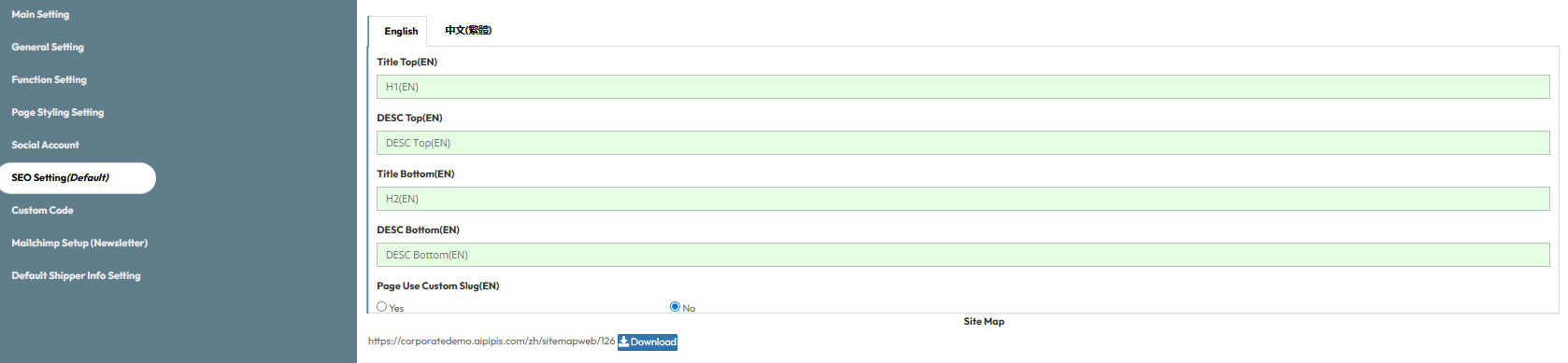
Part 1: Basic SEO Fields
- Top Settings
- Title Top (H1): This is the main name of your page that search engines will read. The H1 is the biggest heading on your page, telling Google exactly what the page is about.
- DESC Top: This is a short summary of your page. People will see this text when your website shows up on Google search results.
- Bottom Settings
- Title Bottom (H2): You can set a different name for the bottom part of your page. The H2 acts as a smaller sub-heading used lower down on the page to organize your text.
- DESC Bottom: A short summary describing the bottom part of your page.
- Page Use Custom Slug (Yes/No): Toggle this to "Yes" to customize the link address for your page. Instead of using random numbers, you can type simple words like "about-us" to make the link look clean and easy to read.
- Site Map: A site map is a file (in XML format) that acts as a list of all the pages on your website. You send this file to Google so it knows all your pages exist and can show them in search results.
Part 2: Multi-Language & Usage Guide
How should I fill in these boxes to get the best results?
- Title Top & Title Bottom: Keep it short and clear. Just use simple words to say what the page section is about.
- DESC Top & DESC Bottom: Think of this as a short advertisement. You have about one or two sentences to tell people why they should click on your page. Make it sound interesting.